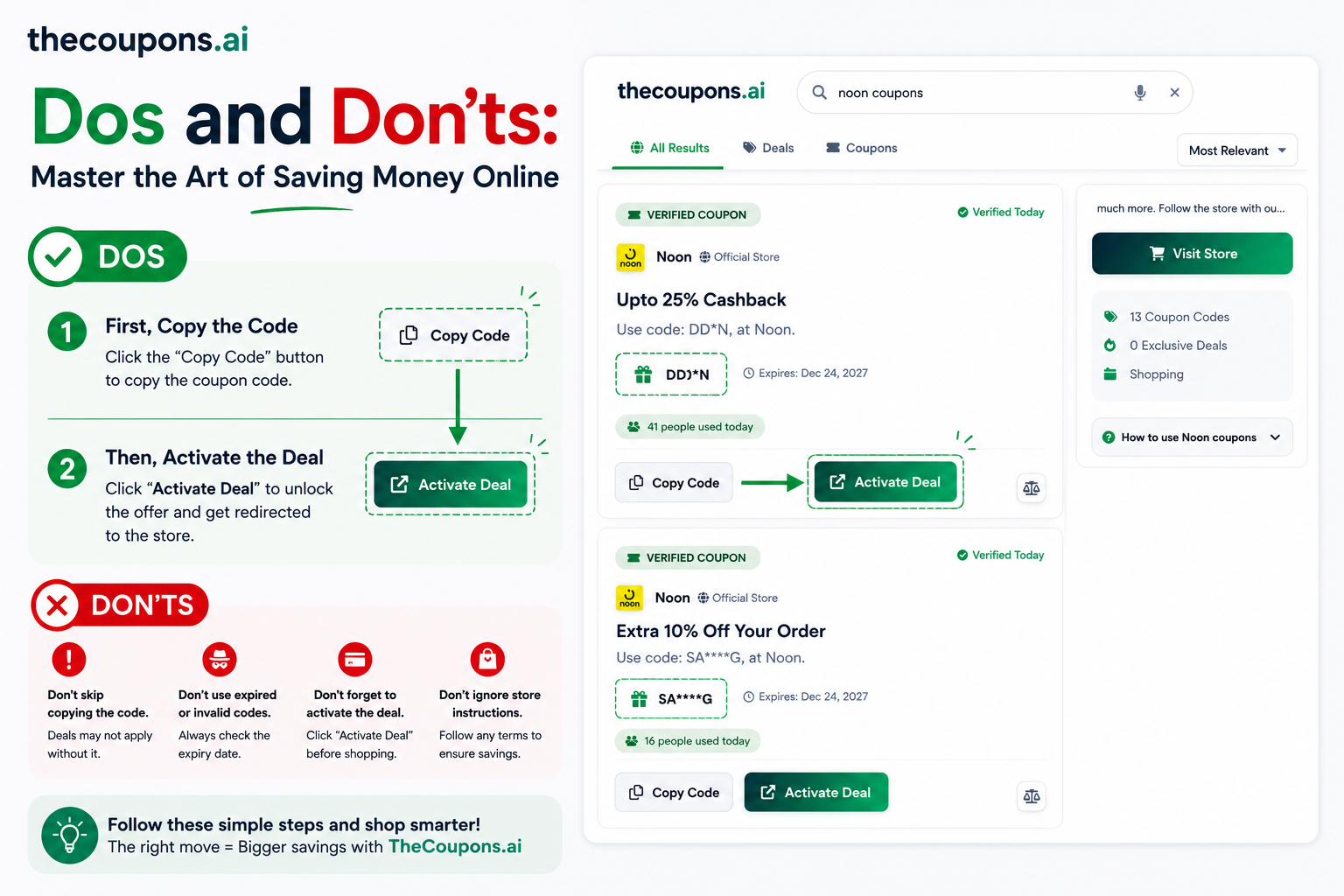
Finding a working coupon code feels great. Watching your total drop from $89 to $54 at checkout is even better. But are you using TheCoupons.ai the right way? Many shoppers miss out on savings simply because they don't follow a few simple best practices. This guide covers the essential dos and don'ts for getting the most out of TheCoupons.ai. Follow these tips, and you will save more time, more money, and avoid frustration.
⭐ The Golden Rule of TheCoupons.ai
First copy the code, then click activate deal. This simple two-step process ensures your discount is always applied correctly and you never lose a valid coupon.
TheCoupons.ai Dos: Best Practices for Maximum Savings
✅ DO: First Copy Code, Then Click Activate Deal
This is the most important rule. When you find a coupon on TheCoupons.ai, always copy the code first, then click the "Activate Deal" button. Why? Copying the code stores it in your clipboard. Clicking "Activate Deal" opens the store website. Once you are on the store's checkout page, you simply paste the code. If you click "Activate Deal" first and then try to copy the code, you might lose the code or get distracted. The sequence matters: copy → activate → paste → save.
✅ DO: Check Expiration Dates Before Using
Every coupon on TheCoupons.ai shows an expiration date. Always check this before you start shopping. A coupon that expires tomorrow might still work today, but you need to complete your purchase before the deadline. Plan your shopping around the expiration date to avoid disappointment at checkout.
✅ DO: Read the Terms and Conditions
Not every coupon works on every product. Some codes apply only to specific categories, require a minimum purchase, or exclude sale items. Before you fill your cart, read the terms and conditions listed below each coupon on TheCoupons.ai. A few seconds of reading can save you from the frustration of an invalid code at checkout.
✅ DO: Try Multiple Codes If One Fails
TheCoupons.ai often lists several active codes for the same store. If your first code doesn't work, try another one. Sometimes codes expire earlier than expected, or a particular code is region-specific. Having multiple options increases your chances of finding a working discount. The platform updates daily, so new codes appear regularly.
✅ DO: Use the Search Bar for Specific Stores
Typing "Nike coupons" or "Amazon promo codes" into TheCoupons.ai search bar is much faster than browsing through categories. The search algorithm finds the most relevant, highest-rated, and newest coupons for your query. Use specific brand names for best results.
✅ DO: Report Expired Codes Immediately
TheCoupons.ai verifies coupons daily, but sometimes a code expires between verifications. If you find a code that doesn't work, report it using the "Report Expired" button. Your feedback helps other shoppers avoid wasted time and keeps the platform accurate for everyone.
TheCoupons.ai Don'ts: Common Mistakes to Avoid
❌ DON'T: Click Activate Deal Before Copying the Code
This is the most common mistake. Users click "Activate Deal," get redirected to the store, then realize they forgot to copy the code. Now they must navigate back to TheCoupons.ai, find the coupon again, and copy it. Some users even close the coupon tab by accident. Avoid this frustration: always copy first, then click activate deal. This simple habit will save you time and ensure you never lose a valid code.
❌ DON'T: Ignore the Coupon Type
TheCoupons.ai clearly labels each coupon type: "Code Required" means you need to enter a promo code manually. "No Code Required" means the discount applies automatically when you click through the link. "Free Shipping" applies only to shipping costs, not products. Ignoring these labels leads to confusion. Always read the coupon type before using it.
❌ DON'T: Use Expired Codes
Expiration dates exist for a reason. Using an expired code wastes your time and creates a poor checkout experience. TheCoupons.ai removes expired codes quickly, but if you saved a code from weeks ago, check the date before attempting to use it. When in doubt, search for a fresh code on TheCoupons.ai rather than relying on old bookmarks.
❌ DON'T: Forget to Check for Stackable Offers
Some stores allow coupon stacking — using multiple codes on the same order. For example, a 20% off code might stack with a free shipping code. TheCoupons.ai sometimes lists stackable offers separately. Look for coupons marked "Stackable" or read the terms to see if combining offers is allowed. When done correctly, stacking can save you 40-60% instead of 20%.
❌ DON'T: Skip Reading User Comments
Other shoppers leave valuable feedback on TheCoupons.ai coupons. Comments like "Worked for me on clearance items" or "Didn't work on electronics" give you real-time intelligence. Before committing to a large cart, scan the user comments. This takes 30 seconds but can prevent wasted effort.
❌ DON'T: Give Up After One Failed Code
Sometimes a code fails due to technical glitches, regional restrictions, or expired terms. Don't abandon your cart. Go back to TheCoupons.ai, try a different code from the list, or search for the same store again. Persistence pays off. Many users give up after one failure, missing out on savings from alternative codes that work perfectly.
📋 The Perfect TheCoupons.ai Workflow
- Search for your store on TheCoupons.ai
- Check expiration dates and read terms for each coupon
- Copy the code (CTRL+C or CMD+C)
- Click "Activate Deal" to open the store website
- Shop normally and add items to your cart
- Go to checkout and paste the code (CTRL+V or CMD+V)
- Verify the discount appears before completing payment
- Report any issues to help other shoppers
Why "Copy First, Then Click Activate Deal" Matters
Let us explain why this golden rule is so important. When you click "Activate Deal," TheCoupons.ai redirects you to the store's website. Some stores open in a new tab, while others replace the current tab. If the coupon code is not already copied to your clipboard, you now have to switch back to TheCoupons.ai, find the coupon again (sometimes losing your place), and copy it. This interruption disrupts your shopping flow and wastes time.
By copying first, the code stays in your clipboard memory. Even if you navigate away from TheCoupons.ai, the code is ready to paste the moment you reach the store's checkout page. This tiny habit saves seconds on every purchase and adds up to minutes of saved time each month. More importantly, it guarantees you never lose a valid code due to a closed tab or forgotten step.
Pro Tips for Power Users
Use the Chrome Extension
The TheCoupons.ai Chrome Extension automatically detects which store you are shopping on and shows relevant coupons instantly. No searching required. The extension also includes an "Apply All" feature that attempts to apply every available code to maximize your discount.
Shop During Major Sales Events
Combine TheCoupons.ai codes with store-wide sales like Black Friday, Cyber Monday, or end-of-season clearance. Stacking a 20% off coupon with an existing 30% off sale gives you 50% total savings. TheCoupons.ai lists special event codes separately, so check back often during holiday weekends.
Sign Up for Deal Alerts
Create a free account on TheCoupons.ai to receive email notifications when new coupons appear for your favorite stores. This proactive approach ensures you never miss a limited-time offer. Many of the best codes expire within 48-72 hours, so instant alerts give you a competitive advantage.
Quick Reference: TheCoupons.ai Dos and Don'ts
✅ DO
- Copy code first, then click activate deal
- Check expiration dates
- Read terms and conditions
- Try multiple codes
- Report expired codes
❌ DON'T
- Click activate before copying
- Ignore coupon type labels
- Use expired codes
- Forget to check for stacking
- Give up after one failure
Frequently Asked Questions
Why should I copy the code before clicking activate deal?
Copying first ensures the code is saved to your clipboard. When you click "Activate Deal," you are redirected to the store. Having the code already copied means you can paste it immediately at checkout without switching tabs or losing your place.
What if a coupon doesn't work?
First, double-check that you copied the code exactly, including any capital letters. Then verify your cart meets any minimum purchase or category requirements. If it still doesn't work, try another code from the same store listing on TheCoupons.ai, or report the expired code using the "Report" button.
Are TheCoupons.ai coupons really verified daily?
Yes. The platform verifies every coupon at the time of publishing. However, some codes may expire between verification cycles. If you encounter an expired code, reporting it helps the team remove it quickly.
Can I use multiple coupons from TheCoupons.ai on one order?
It depends on the store's policy. Some stores allow coupon stacking, while others only accept one code per order. Read the terms for each coupon and test at checkout. TheCoupons.ai sometimes lists stackable offers separately.
Does TheCoupons.ai work internationally?
Many coupons work internationally, but some are region-specific (e.g., US only, UK only). Check the terms and conditions before using a code. The search results often indicate regional restrictions.
👉 Start Saving on TheCoupons.ai 👈
© 2026 TheCoupons.ai. All rights reserved.


Comments (0)